





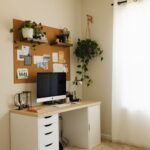


Creating a productive home office space is essential for maintaining focus and enhancing your work performance—especially as many people continue to work remotely or have flexible schedules. Whether you have a dedicated room or a small nook, organizing your workspace thoughtfully can make a world of difference in keeping distractions at bay and motivating you throughout the day. Here are practical tips to help you design and maintain a home office that works for you.
Choose the Right Location
The first step is selecting an area in your home where you can work comfortably and with minimal distractions.
– Privacy matters: Pick a spot away from high-traffic areas like the kitchen or living room.
– Natural light is your friend: If possible, position your desk near a window to enjoy daylight, which can improve mood and energy.
– Consider noise levels: Find a quiet space or use noise-canceling headphones to stay focused.
Invest in Comfortable and Ergonomic Furniture
Your comfort directly affects productivity and overall well-being during work hours.
– Ergonomic chair: Choose a chair with good lumbar support to promote proper posture.
– Adjustable desk: If space allows, use a desk that suits your height and consider standing desks for variation.
– Adequate desk space: Ensure your desk is large enough for your computer, paperwork, and other tools without feeling cluttered.
Organize Your Desk and Storage
A tidy workspace helps reduce stress and improves focus.
– Declutter regularly: Remove unnecessary items from your desk to keep only essentials within reach.
– Use organizers: Drawer dividers, pen holders, and cable management solutions help maintain order.
– Storage solutions: Shelves, filing cabinets, or storage bins keep documents and supplies organized and easy to find.
Optimize Lighting
Lighting plays a significant role in reducing eye strain and maintaining alertness.
– Combine natural and artificial lighting: Use a mix of daylight and task lighting for a balanced setup.
– Desk lamp: An adjustable lamp with warm light can improve visibility without glare.
– Avoid screen reflections: Position your monitor to minimize reflections from windows or lamps.
Set Up Technology Efficiently
Your devices should be arranged for easy access and efficient use.
– Keep cables tidy: Use cable clips or sleeves to avoid tangled wires.
– Ergonomic placement: Place your monitor at eye level and keyboard and mouse comfortably in front of you.
– Backup essentials: Have a backup plan like an external hard drive or cloud storage for important files.
Personalize Without Overdoing It
Adding personal touches can make your office inviting, but be careful not to create distractions.
– Incorporate plants: Small greenery brightens the space and can improve air quality.
– Artwork or motivational quotes: Choose items that inspire you.
– Comfort items: A cozy blanket or cushion can add comfort without clutter.
Establish Clear Boundaries
To maintain productivity, it’s important to set limits between work and home life.
– Define work hours: Stick to a consistent schedule to avoid burnout.
– Use a door or divider: If possible, have a physical boundary to signal when you’re working.
– Communicate with household members: Let others know your work times to minimize interruptions.
Maintain Your Workspace Regularly
Keeping your home office organized is an ongoing process.
– Daily tidying: Spend a few minutes each day putting things back in place.
– Weekly review: Clear out unnecessary papers or supplies regularly.
– Update tech and supplies: Keep your equipment updated and replace worn-out items as needed.
—
A well-organized home office can boost your productivity, reduce stress, and create a positive workspace. By paying attention to your location, furniture, lighting, and organization, you can craft an environment that helps you thrive in your work-from-home routine. Start small, keep it simple, and tailor your space to your unique needs for the best results.