





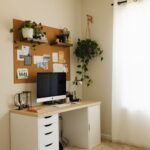

Creating an organized home office is key to maintaining productivity, focus, and a positive work mindset. A cluttered, chaotic workspace can lead to distractions and increased stress, while a neat, well-organized environment helps you stay motivated and on track. Whether you’re working from home full-time or just need a dedicated spot for occasional tasks, these tips will help you design a home office that supports your work goals.
1. Choose the Right Location
The first step to an organized home office is selecting the best space. Ideally, your workspace should be:
– Quiet and free of distractions
– Well-lit, preferably with natural light
– Comfortable with enough room for your desk, chair, and storage needs
If space is limited, consider spots like a corner of the living room, a spare bedroom, or even a converted closet.
2. Invest in Functional Furniture
Picking the right furniture makes organization simpler:
– Desk: Choose a desk with enough surface area for your computer, documents, and other essentials. Desks with built-in drawers offer extra storage.
– Chair: Invest in an ergonomic chair to maintain comfort during long work sessions.
– Storage Units: Shelves, filing cabinets, or stackable bins help keep papers and supplies organized and easy to access.
3. Declutter Your Workspace Regularly
Clutter can accumulate quickly, so adopt habits to keep your workspace tidy:
– Set aside 5-10 minutes at the end of each day to clear your desk.
– Dispose of unnecessary papers and items immediately.
– Use digital tools when possible to reduce paper clutter.
4. Use Organizers and Storage Solutions
Organizers can make a big difference:
– Desk organizers: Keep pens, sticky notes, and other small items neatly separated.
– Cable management tools: Avoid tangled cords with clips, sleeves, or cable boxes.
– File organizers: Sort important documents into labeled folders for easy retrieval.
5. Optimize Lighting for Comfort and Focus
Good lighting protects your eyes and helps you concentrate:
– Position your desk near a window for natural light.
– Use adjustable desk lamps to reduce glare and shadows.
– Consider soft, ambient lighting in addition to task lighting.
6. Personalize Your Space Without Overcrowding
A few personal touches can boost your mood and make the space inviting:
– Add a small plant to bring some greenery.
– Hang an inspiring photo or artwork.
– Keep decorations minimal to avoid distractions.
7. Establish a System for Paper and Digital Files
Organized filing systems save time and reduce stress:
– Create labeled folders for physical documents by category or project.
– Use cloud storage and folders for digital files.
– Adopt a consistent naming convention to easily locate files.
8. Manage Your Time and Tasks Visually
Visual tools can help you stay organized:
– Use a calendar or planner visible at your desk.
– Set up a whiteboard or corkboard for task lists and reminders.
– Consider project management apps to keep track of deadlines.
9. Maintain Cleanliness and Air Quality
A clean, fresh environment supports focus:
– Dust and vacuum regularly.
– Open windows or use an air purifier for fresh air.
– Keep food and drinks away from the workspace to avoid spills.
10. Review and Adjust Your Setup Periodically
As your work habits and needs evolve, so should your workspace:
– Assess your office every few months.
– Rearrange or add storage to improve workflow.
– Remove items that no longer serve a purpose.
—
By thoughtfully organizing your home office using these tips, you’ll create a more productive and pleasant workspace. Taking time to plan and maintain your environment makes it easier to focus, stay motivated, and achieve your goals. Remember, an efficient workspace is one tailored to your specific needs—feel free to experiment and find what works best for you!